Every playlist
has its own path.
Unlimited playlists with independent audio routing. Custom start and end points, crossfades and a clear waveform display.
Included in LT Mber.Choose an edition
SOUND · VIDEO · EFFECTS · RECORDING
Mber brings together playback, independent audio outputs, effect chains, a sampler, metering and multitrack recording. STD adds video and VST3. Prepare your media, run the show and record it in one environment.
ONE APPLICATION. YOUR ENTIRE WORKFLOW.
Mber also handles what happens between pressing Play and hearing sound from the speakers: where the signal goes, how it sounds, when it changes and what gets recorded.
READY FOR YOUR EVENT
Tools for sound engineers, presenters and event organisers. Prepare your music, shape the sound and keep the next cue within reach.
Unlimited playlists with independent audio routing. Custom start and end points, crossfades and a clear waveform display.
Included in LT31-band graphic and 6-band parametric EQ, loudness normalisation and LUFS / SPL metering. A separate effect chain for every playlist.
Included in LTA sampler with colour-coded groups for jingles and sound effects. Play audio while recording individual tracks to WAV.
Included in LT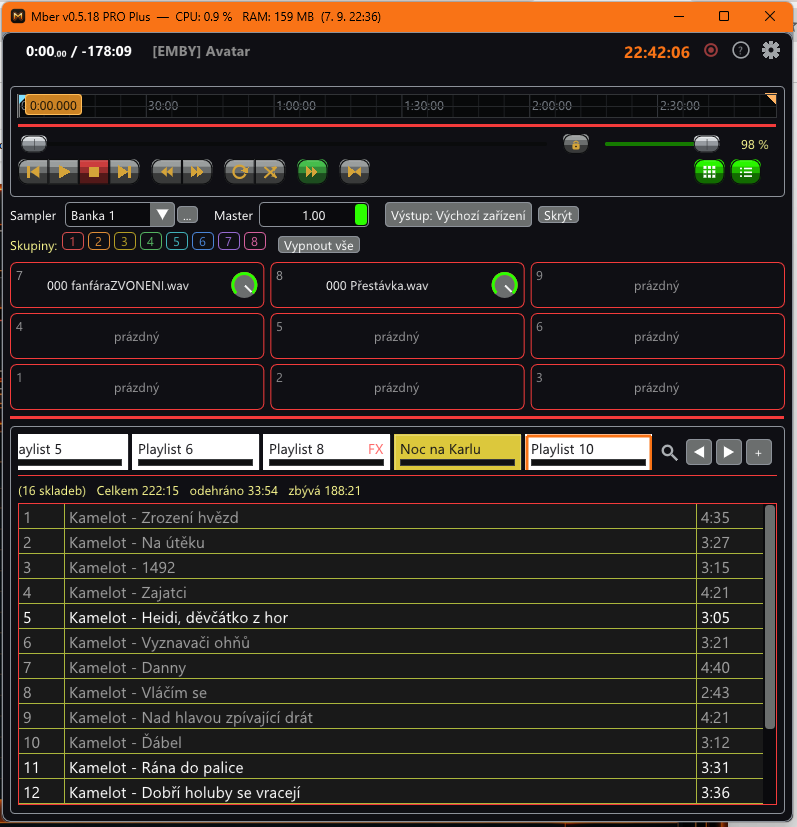
INSIDE MBER
Switch between playlists and trigger prepared sounds from the sampler. Colour-coded groups and custom names help you stay organised during the event.
View full-size screenshot ↗01 / PLAYLISTS AND OUTPUTS LT + STD
Background music in the hall can continue while an announcement plays in another zone. Each playlist has its own device, volume, effects and playback behaviour.
02 / PRECISE PLAYBACK LT + STD
Prepare a passage, loop or fade-out in advance. During the performance, focus on getting the timing right.
At a dance competition, for example: each track has a prepared start, end and fade. When it finishes, Mber waits for your next cue.
03 / EFFECT CHAINS LT + STD / VST3 IN STD
Each playlist can use different processing. Shape the tone, balance material recorded at different levels and add your VST3 plugins in STD.
04 / SAMPLER AND BANKS LT + STD
The sampler runs independently of playlists. Trigger an effect over music, alternate sounds within groups and prepare complete sets for different events.
05 / MULTITRACK RECORDING LT + STD
Capture inputs from your audio interface or mixing console. Each selected channel is saved separately for further work later.
06 / LOUDNESS METERING LT + STD
Built-in LUFS and SPL metering helps you monitor playback levels. STD can also receive measurements from Smaart.
The built-in meter is a loudness monitoring aid, not a certified measurement instrument.
07 / IMAGES AND VIDEO IMAGES IN LT + STD / VIDEO IN STD
Add images, photos and, in STD, video clips to the programme. Send the picture to a projector and keep a confidence monitor beside you.
08 / FILES AND NETWORK SOURCES VIDEO REQUIRES STD
Mber works with common audio files, radio streams and network media. You do not need to copy all your content to one drive first.
Emby requires your own accessible server. Encrypted HLS streams, fMP4 segments and URLs requiring browser-based login are not supported. HEVC video may require a Windows extension. Mber does not include subscriptions to TV or other content services.
09 / YOUR WORKSPACE LT + STD
A dark control room and a bright outdoor venue call for different setups. Adjust appearance, control sizes and window placement to suit where you work.
TRY YOUR OWN LOOK · LT + STD
Change the colours and text size in this playlist preview. Mber also lets you customise other elements, controls and complete skins.
Interactive colour and text demonstration, not the running application. Sample tracks do not play.
ONE APPLICATION. TWO EDITIONS.
Try LT. When you need video, VST3 or more recording tracks, unlock STD in the same installation.
Freeno licence required
Music, effects and a sampler for your event.
350 CZKone-time licence
Everything in LT, plus:
Enter your activation code in Settings. STD unlocks without reinstalling or restarting.
| Feature | LT | STD |
|---|---|---|
| Number of playlists | Unlimited | Unlimited |
| Independent playlist outputs | Yes | Yes |
| Built-in effects and sampler | Yes | Yes |
| Cue, trim, loops and fades | Yes | Yes |
| Playlist templates and sampler banks | Yes | Yes |
| Image slideshows and transitions | Yes | Yes |
| Skins, colour palettes and custom shortcuts | Yes | Yes |
| Lighting operator display | Yes | Yes |
| Internet radio | Yes | Yes |
| Built-in LUFS / SPL metering | Yes | Yes |
| Simultaneous recording tracks | Up to 4 | No edition limit |
| ASIO recording | No | Yes |
| VST3 plugins | No | Yes |
| Video | No | Yes |
| Smaart API | No | Yes |
READY TO PRESS PLAY?
Get in touch to try LT or order an STD licence. We will help you with the next steps.
The buttons open your email application.
A public installer download is being prepared.